Artificial Intelligence (AI) has become an essential part of everyday life in 2026. From writing articles and creating videos to designing graphics and developing software, AI tools are transforming how people work, learn, and create. Businesses are using AI to improve efficiency, students rely on it for learning, and content creators use it to produce professional-quality work in less time.
Whether you’re a blogger, freelancer, student, entrepreneur, or software developer, choosing the right AI tools can save hours of work and increase productivity. In this guide, we’ll explore the top AI tools that are making the biggest impact in 2026.
1. ChatGPT
Best For: Writing, research, coding, brainstorming, customer support
ChatGPT is one of the world’s most widely used AI assistants. It can write blog posts, emails, marketing copy, programming code, and business documents. It also answers questions, summarizes articles, translates languages, and helps generate creative ideas.
Key Features
- AI content writing
- Coding assistance
- Research support
- Email drafting
- Language translation
- Brainstorming ideas
Why People Love It
- Easy to use
- Fast responses
- Excellent writing quality
- Suitable for beginners and professionals
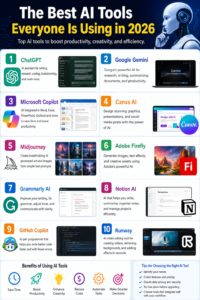
2. Google Gemini
Best For: Research and productivity
Google Gemini combines advanced AI with Google’s ecosystem, making it an excellent choice for searching, summarizing documents, and creating presentations.
Features
- Smart research
- Document summaries
- Writing assistance
- Spreadsheet support
- Presentation generation
3. Microsoft Copilot
Best For: Office productivity
Microsoft Copilot is integrated into Word, Excel, PowerPoint, Outlook, and Teams. It helps users automate repetitive office tasks and create professional documents quickly.
Features
- AI-generated documents
- PowerPoint creation
- Excel formula assistance
- Email drafting
- Meeting summaries
4. Canva AI
Best For: Graphic design
Canva AI makes professional design accessible to everyone, even without prior experience.
Features
- AI image generator
- Magic Design
- Background remover
- Social media templates
- Presentation creator
Perfect For
- Bloggers
- Small businesses
- Social media managers
- Marketing teams
5. Midjourney
Best For: AI artwork
Midjourney creates stunning digital artwork from simple text prompts, making it popular among designers, marketers, and artists.
Features
- Photorealistic artwork
- Fantasy illustrations
- Product concepts
- Marketing visuals
6. Adobe Firefly
Best For: Creative professionals
Adobe Firefly uses generative AI to simplify image editing and design.
Features
- Text-to-image
- Generative Fill
- AI text effects
- Professional image editing
7. Grammarly AI
Best For: Writing improvement
Grammarly AI helps users improve grammar, tone, readability, and clarity while also offering AI-powered rewriting and suggestions.
Features
- Grammar checking
- Tone adjustment
- AI rewriting
- Writing suggestions
- Plagiarism support (selected plans)
8. Notion AI
Best For: Productivity and project management
Notion AI helps organize information, summarize meetings, and create notes and project documentation.
Features
- AI writing
- Meeting summaries
- Task organization
- Knowledge management
9. GitHub Copilot
Best For: Software development
GitHub Copilot acts as an AI programming assistant by suggesting code, explaining functions, and helping developers solve coding challenges.
Features
- Code completion
- Bug fixing
- Code explanation
- Support for multiple programming languages
10. Runway
Best For: AI video creation
Runway helps creators generate videos, remove backgrounds, edit footage, and apply AI-powered visual effects.
Features
- Text-to-video
- AI video editing
- Motion tracking
- Background removal
- Video enhancement
Benefits of AI Tools
Using AI tools can help you:
- Save time on repetitive work
- Improve productivity
- Generate creative ideas
- Create high-quality content
- Reduce operational costs
- Automate workflows
- Learn new skills
- Improve collaboration
How to Choose the Right AI Tool
Before selecting an AI tool, ask yourself:
- What tasks do I want to automate?
- Does it fit my budget?
- Is it easy to use?
- Does it integrate with my current software?
- Does it offer good privacy and security?
AI Trends to Watch in 2026
AI technology continues to evolve rapidly. Some of the biggest trends include:
- AI-powered search engines
- Smarter virtual assistants
- AI-generated videos
- Personalized education
- Healthcare automation
- AI coding assistants
- Business process automation
- Advanced creative tools
Frequently Asked Questions
Which AI tool is best for bloggers?
ChatGPT and Grammarly AI are excellent for writing, editing, and content planning.
Which AI tool is best for graphic design?
Canva AI is ideal for beginners, while Adobe Firefly is better suited to advanced creative workflows.
Which AI tool is best for programmers?
GitHub Copilot is one of the most popular coding assistants for developers.
Which AI tool is best for video editing?
Runway offers powerful AI-powered video editing and generation features.
Final Thoughts
AI is no longer a technology of the future—it’s a practical tool that helps people work faster, create better content, and solve complex problems. Whether you’re writing articles, designing graphics, editing videos, or building software, the right AI tool can significantly improve your productivity and creativity.
Start by exploring the tools that best match your needs, experiment with their features, and incorporate them into your daily workflow. As AI continues to advance, learning how to use these tools effectively will be an invaluable skill for both personal and professional success.